Apr 21, 2013

Apply the MIT License to software

This is a method to publish software that applied the MIT License.
In order to declare the software license,

  • Describe license in the file header comment
  • Include license text as text file
  • Display license text on the installer

And so on.

An easy way is to include text file.
Template of the MIT license is open to the public at the following websites.

Open Source Initiative
http://opensource.org/licenses/mit-license.php

Japanese translation by Open Source Group Japan
http://sourceforge.jp/projects/opensource/wiki/licenses%2FMIT_license

Copy the template and put your name in , and put also development year in
Save the file as "LICENSE.txt" and distribute software, and this method is complete.

Apr 20, 2013

Loop playback BGM with enchant.js

This is how to loop playback the BGM with enchant.js.

// Loop playback the bgm
game.assets['bgm.mp3'].play();
game.assets['bgm.mp3'].src.loop = true;

Be careful because loop parameter must set after play.

// This case not loop playback the bgm
game.assets['bgm.mp3'].src.loop = true;
game.assets['bgm.mp3'].play();

Apr 19, 2013

Trim images with Preview of Mountain Lion

This method is convenient to removing blank spaces from images.

Open the image with Preview.


Click the pencil icon to show tools.


Click the magical stick icon (instant alpha). If the icon is invisibility, widen window.


Drag area that you want remove, and make selected.


Press the Delete key and remove the area.


You can invert the selected area by command + shift + I.

Select the blank space with magical stick.

Press command + shift + I and invert the area.
You can remove the area that not selected by command + K.

Mar 13, 2013

Line-height is ignored on Canvas


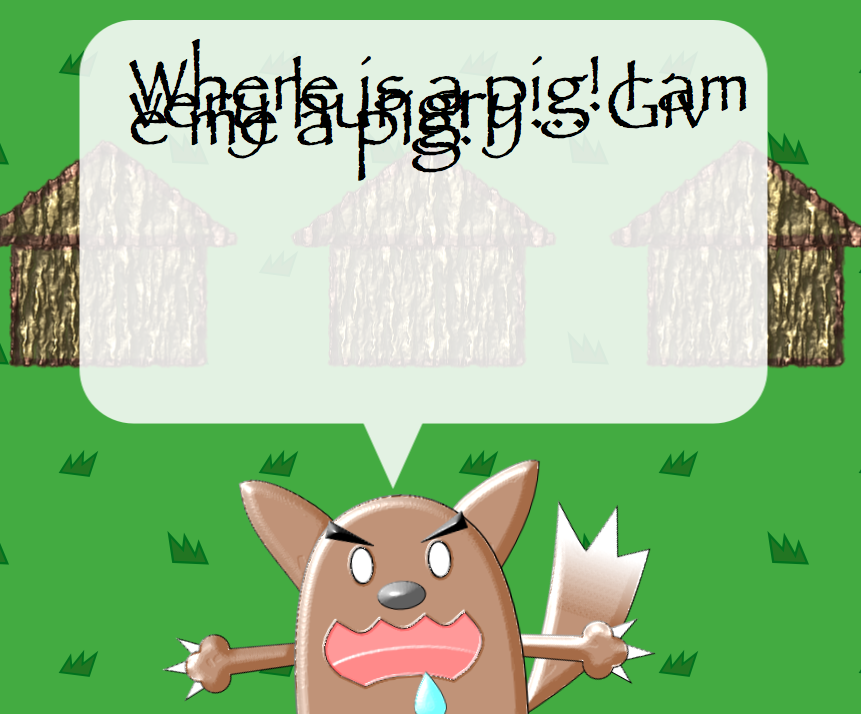
    You can't set line-height on HTML5 Canvas. You can set the font of canvas in the same manner as CSS, but number of line-height is ignored.

    I bump into a this problem.

// output statements are skipped.
var message = 'Where is a pig! I am very hungry... Give me a pig!';
var label = new Label();
label.color = 'black';
label.text = message;

// both font-size and line-height are 75px, but those are ignored.
label.font = '75px/75px fantasy';

game.currentScene.addChild(message);


On Canvas API Specification, line-height number is automatically set 'normal'.
I done deal in such a way as to using array by hand.


var messages = [
    'Where is a pig!',
    'I am very hungry...',
    'Give me a pig!'
];
for(var i = 0; i < messages.length; i++) {
    var label = new Label();
    label.color = 'black';
    label.text = message;
    label.font = '75px fantasy';
    label.y = 75 * i;  // 手動で高さを調整
    game.currentScene.addChild(message);
}

Reference
- W3C HTML Canvas 2D Context, Level 2 Nightly 
http://www.w3.org/html/wg/drafts/2dcontext/html5_canvas/#text-styles

Feb 15, 2013

Minesweeper Gyakushiki

    I published a new browser game, "Minesweeper Gyakushiki". Gyakushiki is a japanese word that meanes "Reverse". Bombs are shown on display from the start of game. Your object is to open all number panels. This game is compatible with PC and SmartPhone. And it's MIT License.


    Source codes are opend on github page. The game is powered by enchant.js that is JavaScript library for HTML5 browser games from japan.

Dec 21, 2012

OkaTimer is released


OkaTimer is timer application for doing your task more quickly.
It display the target time and elapsed time from start.
You can use this application by either desktop or smartphone.

Usage

  1. After input to task name and choose target times, push start button.
  2. You can switch RUN and Stop by toggle switch.
  3. Finish your task, check the elapsed time.
  4. If you want next task, push back button and input next one.

Notice

  • This application can runs one task only.
  • Target time is limited from "0h 5min" to "24h 55min".
  • No alert when the smartphone is slept.

Contact

Dec 20, 2012

Janken Shooting is released


    I released Janken Shooting on GitHub.
    http://yokano.github.com/JankenShooting/

    It is browser game for Google Chrome written by Javascript.
    And it working on Google App Engine.

    You can see source codes form my GitHub page.